
Features
Sales and profit reports for your shop, on your phone
Your shop's numbers answer before you ask: today against yesterday, best sellers, peak hours and profit after cost, on your phone wherever you are.
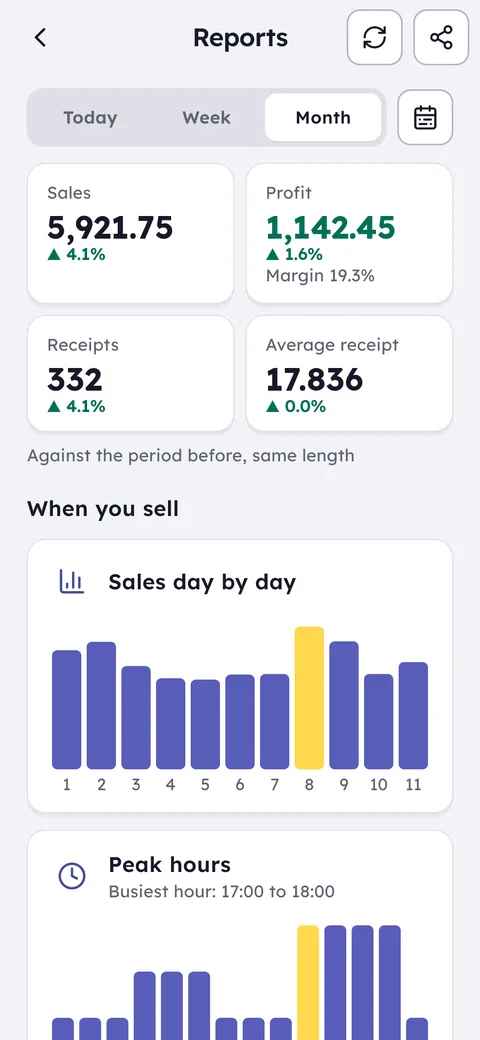
What this feature does: Reports
Today vs yesterday
See straight away whether today is ahead or behind, and the hour the pace changed.
Best sellers
The items that carry your shop, and the ones that have not sold in 14 days.
Peak hours
Know when the shop gets busy and plan shifts and stock around it.
Real profit
Sales minus cost, per item and per day, not just the sales figure.
Accountant file
A PDF with sales, purchases and a tax estimate, to print or send to your accountant.
Any period as a PDF
Pick the dates you want and share that report as a PDF to print or send.
Every invoice, refund and expense flows into the reports on its own, with nothing extra to enter.
On your phone, tablet or PC, see today's sales, profit and best sellers.
Reorder what is running low, drop what does not move, and staff up for peak hours.
Plenty of shops work hard without knowing where their real profit comes from. Ghalleh turns the day's invoices into plain answers: how much you sold today against yesterday, which items sell most, which hour is busiest, and what you made after cost. The numbers are on your phone whether you are at home or on the road.
The reports look ahead too: how many days each item's stock will last, with reorder suggestions, what the goods in your shop are worth, and how much customers owe in total. And when your shop has its best day ever, Ghalleh records it as the number to beat on the days that follow.
- Does this item earn its shelf?The slow-mover report lists what has not sold for a while and how much of your money is sitting in it.
- Planning the Thursday evening shiftPeak hours show when the shop is really busy, so the extra pair of hands comes in at the right time.
- An item selling at a lossThe list of items priced under cost, and of those with a margin under 10%, catches it before it repeats.
- Month end, supplier payment dueCurrent stock value and total unpaid debts are in front of you, so you know what you can pay before you reorder.
A weekly analysis every Saturday
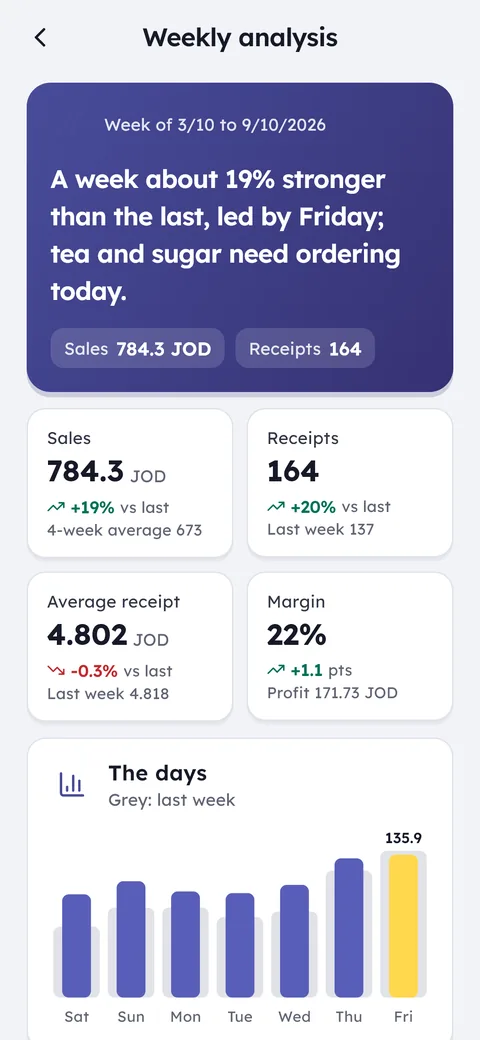
Every Saturday at 8 am the weekly analysis arrives: sales, number of invoices, average sale value and margin, all against the week before, with the best sellers and the strongest days of the week.
With the numbers come practical recommendations written for your shop, and a PDF to share with a partner or your accountant. Past analyses stay saved week by week.
Profit per item and per category
- Profit on sales after cost, for the day, week, month or any dates you choose.
- Profit by category, so you know which part of the shop carries it.
- Items priced under cost, and items with a margin under 10%.
- Slow-moving stock and its value, with the last sale of each item.
- Stock value at cost and at selling price.
- Offer discounts, waste and items given on the house, kept visible instead of vanishing inside the profit figure.
Peak hours and the strongest days
The selling times report covers the last 4 weeks by day and hour, so you see that Thursday evening beats Sunday morning, and that one particular hour deserves an extra pair of hands. Reports also show sales day by day and month by month, so you can compare one season with the next.
What to hand your accountant
Export the report gives you a PDF with sales, purchases and a tax estimate to print or send to your accountant. The reports also show where your invoices stand on JoFotara, sales by cashier and by payment method, expenses, customer debts, what you owe suppliers, and a month-end snapshot.
The final figure for your tax return stays with your accountant; Ghalleh hands them tidy numbers to start from instead of a bag of receipts.
Common questions
Can I see reports from my phone when I am away?
Yes. Reports live on your account and sync, so you open them on a phone, tablet or PC wherever you are.
How is profit worked out?
Profit is sales minus the recorded cost of the items. Enter a cost for each product, or let purchase invoices keep it up to date.
Can I compare employees or branches?
Yes. You see sales per cashier, and with more than one branch you see each branch alone or all of them together.
Can I see my average sale value?
Yes. The weekly analysis shows the average sale value against the week before, with the number of invoices, sales and margin.
What do I hand my accountant at month end?
The accountant file from Ghalleh: a PDF with sales, purchases and a tax estimate. The final figure for your tax return stays with your accountant.
Open your shop on Ghalleh today.
Download the app, set up your shop yourself and try every feature free for 14 days, with no card.