

Mobile shop system: what the shop needs after the first sale
Phones by colour and storage, not one item called "phone"
In a phone shop the same model comes in three colours and two storage sizes, each with its own price and count in the cabinet. In Ghalleh you create the model once and add the versions under it as options, each with its own barcode, price and stock. When someone asks for the blue one in 256, you know before you open the cabinet.
Accessories run into the hundreds: cases for every model, screen protectors, chargers, cables, earphones. Import the supplier's list from Excel with names, barcodes, costs and prices in one go, then edit what you need. That alone saves a week of typing.
Cost changes with every shipment
The wholesale price of a phone or charger shifts from one shipment to the next, and profit worked out on an old cost isn't real. When you enter a purchase invoice in Ghalleh, item costs update automatically, so every sale's profit is based on what you actually paid last.
Every purchase invoice is logged against the supplier, so you see what you owe each wholesaler and record your payments. Days of stock left shape the next supplier order: what runs out within a week you order now, what lasts two months can wait.
- Stock value at cost any time, phones and accessories together
- Items unsold for 14 days, before the model goes stale
- A low-stock alert per item at the level you choose
Some cash, some card, the rest on account
A phone rarely sells on a single payment. The customer pays part in cash and part by card, or sends some by CliQ, and the rest becomes a debt or an installment plan. In Ghalleh you split payment on the same invoice, and each part lands where it belongs: cash in the drawer, card in the terminal balance, the rest on the customer's profile with its due date.
You get an alert whenever a new debt is created, with the employee's name and the amount. If you'd rather nobody but you sells on credit, switch that permission off for their account.
Repairs: the phone is with you, the bill is open
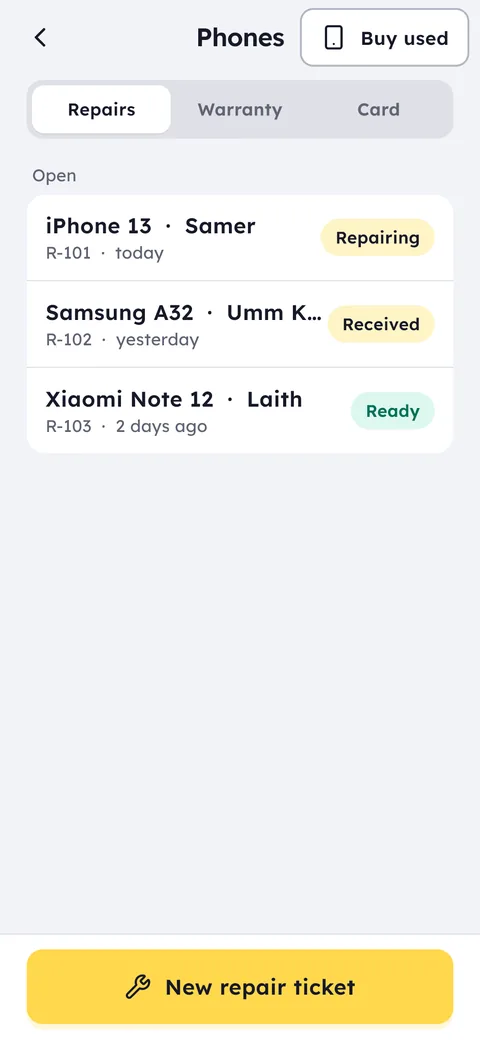
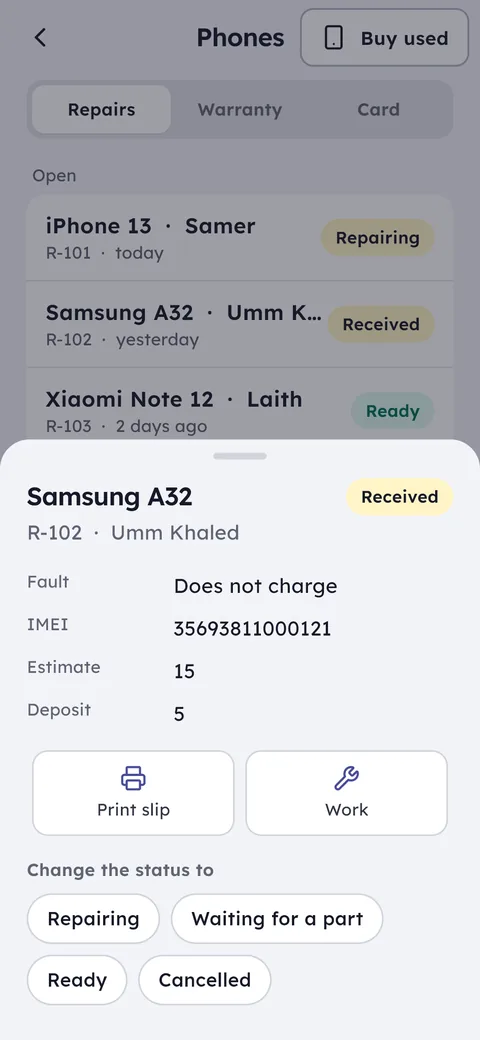
A customer leaves a phone for a screen swap and pays a deposit. You issue the full repair invoice and record the deposit as a first payment, so the rest sits on their profile until pickup. At handover you search by name or invoice number and see what's paid and what isn't.
Add the parts you fit, screens, batteries, charging ports, as stock items with their cost. When a part goes on a repair invoice it comes off stock, and you see the real margin on the repair after the part, not just the labour.
If your technician works on commission, have them issue repair invoices from their own account. You see the total they handled in the month and work out their share from a clear number, not from memory.
Accessories, used phones and the late-night balances
Cases, screen protectors and cables earn little each, but they sell dozens of times a day. So a mobile shop system needs fast selling: scan barcodes continuously with the phone camera, item after item, without going back to the list, or use a USB or Bluetooth scanner at the counter.
At month end, compare accessory profit with phone profit. Plenty of owners find the case rack pays the rent, while the expensive handset ties up more money than it earns.
When a customer sells you their used phone, you record it with its IMEI and the price you paid, and it goes into stock at that cost. When you sell it later you see its real profit, and its whole history is one search of the number away.
Then there's closing: a phone shop ends every night on more than one balance, cash in the drawer, what went through the card terminal, and what came in by CliQ. Ghalleh tracks each one separately so you can match every number to its source, and if cash is off when the shift closes you get an alert with the difference.
Your staff at the counter, you at the wholesaler
Most owners spend half the day away from the shop. Set each employee's permissions: who can change a price, who can discount, who can refund a phone. Every refund or big discount reaches you as an alert and stays in the activity log with the name and the time.
Staff clock in from their phones only while inside the shop, so you know who's working, and you see sales per employee if you pay commission on phones.
More than one phone shop on one account
With two shops in the same area, the phone that sold out here may be sitting in the other branch. Move it with a stock transfer, and see each branch's sales and all branches together from your phone. That's the difference between mobile shop software that grows with you and a notebook stuck in one drawer.
A phone recorded by its IMEI keeps that number when it moves to the other branch, so when it sells there you still know which shipment it came from and what it cost you.