
Features
Inventory and stocktake software for shops
Know what is on your shelves without counting: sales take stock out, purchase invoices put it back and update the cost, and when stock runs low you hear before a customer asks.
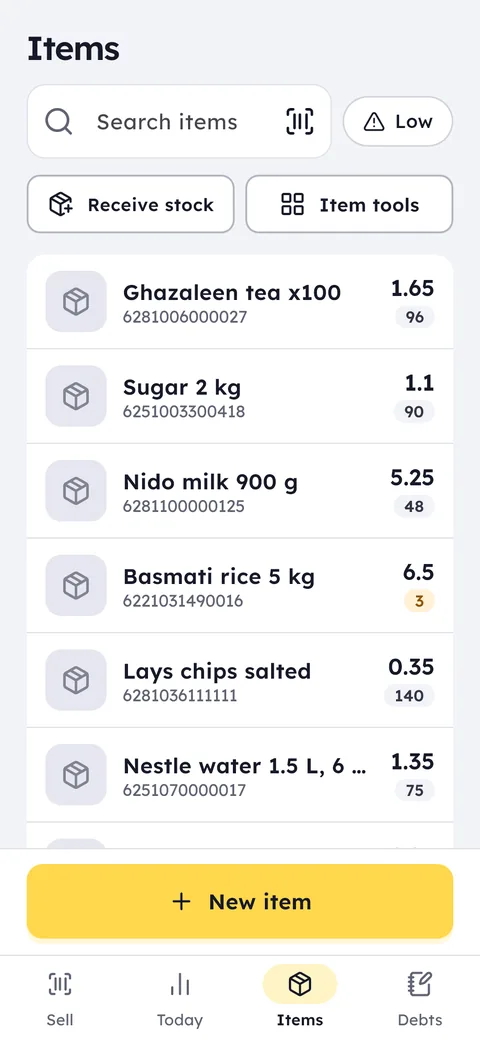
What this feature does: Inventory and stocktake
Low-stock alerts
Set a minimum for each item and Ghalleh tells you when stock falls below it.
Expiry dates
Record the expiry date of each batch as it arrives, and see what expires within a month before it spoils on the shelf.
Suppliers and purchases
A purchase invoice adds quantity and updates cost, and you see what you owe each supplier.
Supplier invoice photos
A photo or a PDF: Ghalleh reads the items, quantities and prices, and you check them before they go into stock.
Excel import
An xlsx, xls or csv file of up to 20,000 rows. Ghalleh matches the columns and shows the items before saving.
Millilitres and grams
Sell perfume by the millilitre and coffee by the gram, and stock comes off the same way you sold it.
Serials and warranty
For phones and electronics: the IMEI or serial number of each unit, with the warranty end date printed on the receipt.
Damage and waste
Record what was damaged, expired or used in the shop, with the reason, so it leaves stock instead of becoming an unexplained gap.
With barcode, photo, category, cost and sale price, import them all at once from Excel, or pick from the ready items.
Receiving from a supplier adds stock and updates cost, or photograph their invoice and Ghalleh reads it. Sales take stock out automatically.
See low items and days of stock left, then gather the order list into a message for your supplier.
Untracked stock costs you twice: slow items tie up your money on the shelf, and gaps lose you sales you should have made. In Ghalleh every product has a barcode, photo, category, cost, sale price and tax, plus units and variants like size and colour if you need them. Sales take stock out and purchase invoices put it in, so the numbers stay right without a daily count.
Over time those numbers start answering questions: which items have not sold in 14 days, how many days each item's stock will last, and what the goods in your shop are worth right now at cost and at selling price. When you do need a physical count, scan the shelves with the camera, enter what you find, and Ghalleh shows the gap against your records.
- Milk runs out before ThursdayGhalleh works out how many days your stock will last at the current pace, so you order before the shelf is empty.
- A forty-line supplier invoicePhotograph it, Ghalleh reads the items, quantities and prices, and you only check the lines it could not match.
- Cans close to expiryThe list of what expires within a month helps you put items on offer or send them back to the supplier before they turn into a loss.
- Your supplier raised the priceEnter the new purchase invoice, the cost updates, and you see right away how your margin on that item changed.
Simple stock and warehouse software for a shop
Most shops do not need heavy warehouse software that takes an accountant to run. They need to know how much of each item is left, what to reorder, and what the stock is worth. In Ghalleh stock stays right because it moves with what you already do: sales take out, receiving adds, returns put back, stocktakes correct.
If you keep goods in a separate warehouse, add it in Ghalleh the way you add a branch: it has its own stock, receiving and staff, it does not sell, and a transfer moves goods from it to the shop, out of one and into the other. A warehouse counts as a branch on your plan, so Pro covers a shop and a warehouse, or two shops.
That makes the till itself your sales and stock software: what you sell at the counter and what sits in the warehouse, in one account you can see from your phone.
Stocktake by barcode
- Open the stocktake
From the item tools choose Stocktake, and count whatever you want: one shelf or the whole shop. - Scan and count
Scan the item with the camera or a scanner and type what you find on the shelf. - Check the differences
Ghalleh shows the gap between counted and recorded for every item, so you see what is short and what is over. - Correct the stock
Save the count and the quantities are set, with the value of any shortage or surplus at cost. Sales made during the count still count.
Goods in, goods out and suppliers
In Items tap Receive stock, choose the supplier, scan or search what arrived, and type the quantity and cost price. At the end you type how much you paid now, and the rest goes on the supplier's account. Debts shows what you owe each supplier and what you have paid, and your payments to them can be cash or a cheque with its number and due date.
Every item has a movement history that answers where did the stock go: each sale, customer return, delivery, return to supplier, stocktake, and each damaged or wasted unit with its reason. Expired or damaged goods go back to the supplier from the receiving screen and come off their account.
Import from Excel or CSV, up to 20,000 rows
If your items are in a file from a supplier or your old system, do not type them one by one. From the item tools choose Import from Excel and pick an xlsx, xls or csv file of up to 5 MB and 20,000 rows.
Ghalleh reads the column headings and matches them itself: name, barcode, selling price, cost, quantity, unit, category, brand, item code, wholesale price, low stock level and tax rate. You fix any column it did not recognise, or leave it out.
Nothing is saved until you review the items and confirm. Rows with a problem, such as a price that is not a number, a duplicate barcode or a barcode Excel turned into scientific notation, show with their row number and the reason so you can fix them. No file yet? Download the ready template and fill it in.
Photograph the supplier's invoice
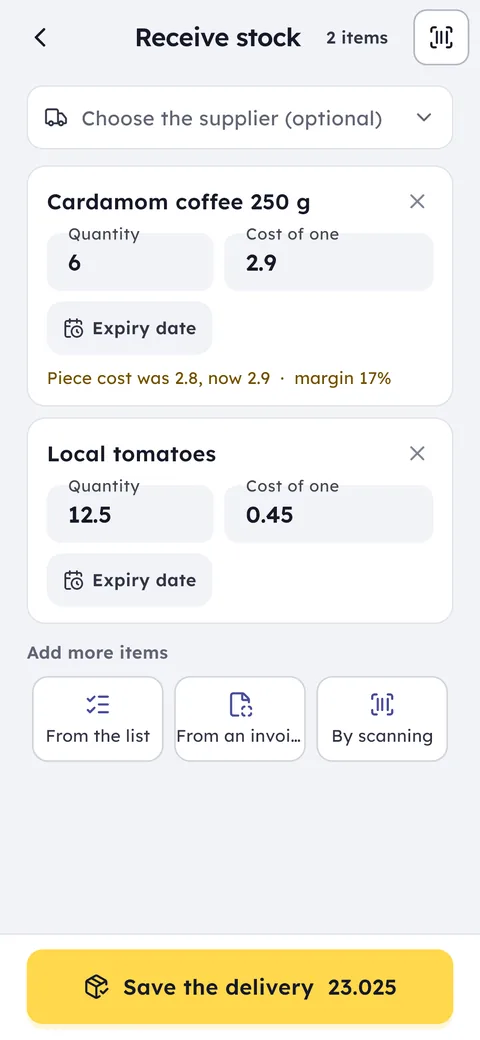
A paper supplier invoice is one of the slowest jobs in the shop: dozens of lines copied by hand. In Ghalleh you photograph it with your phone, or pick a PDF of up to 5 pages, and Ghalleh reads the items, quantities and prices and matches them to your items.
Lines Ghalleh matched show green, and lines it is unsure of show yellow for you to pick the item or skip it. It checks the sums too: if quantity times price does not equal the line amount, or the lines fall short of the invoice total, the warning shows on that line before anything goes into stock. It tells cartons from pieces, so stock is received in the right unit.
Invoice reading needs the internet, and each plan includes a monthly allowance: 60 invoice photos on Start, 150 on Pro and 5 in the free trial.
How a grocery keeps track of expiry (expiration) dates
When you receive items with a shelf life, Ghalleh asks for the expiry date first, and the lot number is optional. Each batch keeps its own date, so a box that arrived today never mixes with one from three months ago.
Whatever expires within a month shows on the Today screen and in Stock in numbers, with the quantity actually left. You decide in time: put it on offer, return it to the supplier, or record it as expired so it leaves stock. And if an item from an expired batch reaches the counter, the cashier sees a warning before the sale.
Common questions
Can I import my products from Excel?
Yes. An xlsx, xls or csv file of up to 20,000 rows: Ghalleh matches the columns itself and shows the items for you to review before saving. The same import updates the prices of many items at once.
Can Ghalleh read a supplier invoice from a photo?
Yes. Photograph the invoice or pick a PDF, Ghalleh reads the items, quantities and prices and matches them to your items, and you check the lines before they go into stock. Each plan has a monthly allowance of invoice photos.
How do I see what is close to expiry?
Record the expiry date when you receive stock, and what expires within a month shows on Today and in Stock in numbers, with the quantity left.
Does it handle sizes and colours?
Yes. One product can have units and variants such as size and colour, so you track each variant on its own.
Can I track what I owe suppliers?
Yes. Record purchase invoices against each supplier and Ghalleh shows what you owe and what you have paid, and gathers an order list you send them as a message.
Can I keep a warehouse separate from the shop?
Yes. Add the warehouse like a branch, with its own stock, and transfer goods from it to the shop. A warehouse counts as a branch on your plan.
Open your shop on Ghalleh today.
Download the app, set up your shop yourself and try every feature free for 14 days, with no card.