
Features
A staff attendance app for your shop, on the employee's phone
Clock in from the employee's phone, only inside the shop: see who came in and when, hear if someone is late, and find the hours ready for payroll at month end.
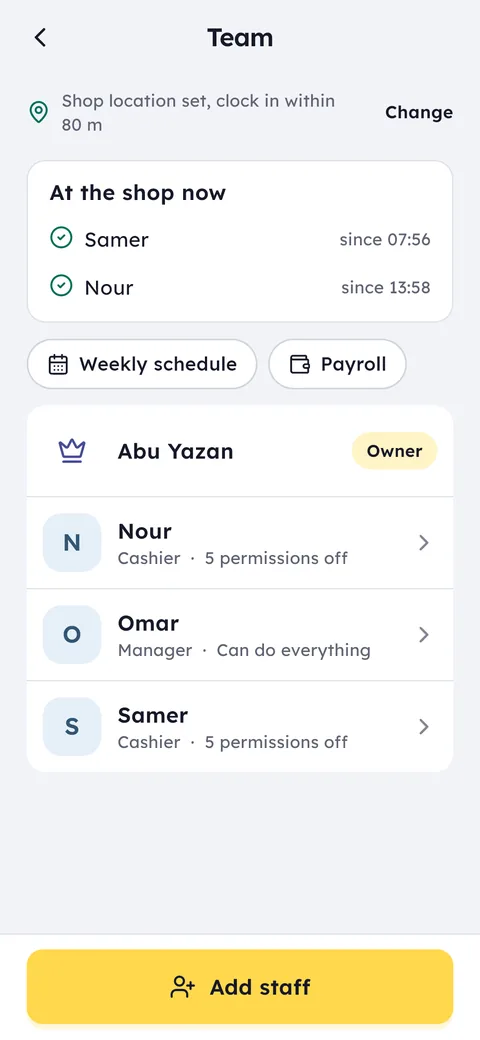
What this feature does: Staff attendance
Inside the shop only
Put the shop on the map once. A clock-in or clock-out from outside it is not accepted.
The employee's own phone
No fingerprint machine on the wall, no cards. Each employee's Android phone is enough, and iPhone is coming soon.
Shift schedules
Plan the week's shifts, copy last week, and see who is working now and who has not arrived yet.
Late alerts
If an employee has not started a quarter of an hour after their scheduled shift, your phone gets an alert.
Payroll-ready hours
At month end each employee's hours and days are already added up, with any salary advances recorded against them.
Advance requests
Staff ask for an advance from their phone, you approve or refuse, and it is recorded on their payroll.
Search for the area or use your current location, move the map until the pin sits on the shop door, and choose the distance within which clock-ins count.
In Team add each employee with a name and role. They scan a QR code with their phone to join, then clock in and out while at the shop.
See who came in and when, who is working now, and take the month's hours straight to payroll.
A paper attendance book and a fingerprint machine on the wall share the same problem: both are a fixed thing in one place, and both need someone to add up the numbers at month end. A colleague can sign for a colleague on paper, the machine breaks down or needs a technician, and two branches mean two machines. Ghalleh moves attendance to the thing every employee already carries: their phone.
A phone on its own is not enough, though. It is easy to tap “I'm here” from home. So you set the shop's location once, and a clock-in or clock-out only counts while the phone is inside it. The record stays honest without you standing at the door every morning or asking anyone when they arrived.
Shifts come with it. Plan each employee's week, open your phone at any hour and see who is working now, who has clocked in and when each person arrived. If you need to know where a whole month's hours went, they are kept day by day for every employee.
Because every clock-in carries its real time, the familiar arguments come to an end: who was late, who left early, who covered for a colleague. The record is clear to both sides. A punctual employee sees their hours kept exactly as worked, and you see the same picture from home or from your other branch.
At month end each employee's hours are added up and ready for payroll, together with the salary advances recorded during the month. No more totting up on a calculator, no more arguments over an hour. The final salary and deductions stay with your accountant; Ghalleh hands them clean numbers to start from.
Attendance is part of the Ghalleh cashier app itself, not a separate app: attendance, shifts and payroll hours are in every plan, with no hardware and no installation. The number of staff depends on the plan: Start covers the owner plus 3 staff, and Pro the owner plus 10. And because selling and attendance live in the same app, you see each employee's sales next to their hours for every shift.
- 7:58 am at the shop doorAn employee arrives, opens the app and clocks in. The phone is inside the shop's location, so the time is saved as it is, with no sheet of paper and no queue at a fingerprint reader.
- A clock-in from the roadAn employee still on the bus two kilometres away tries to clock in. It is not accepted until they arrive, so the record stays honest.
- 8:15 and nobody is inThe morning shift starts at 8. A quarter of an hour later the late alert reaches you, so you act before a customer finds the shop closed.
- The last day of the monthInstead of collecting sheets and asking everyone how many days they worked, you open each person's hours with their advances and send them to your accountant.
The shop's location on the map
In Team open Shop location, search for the area or street, or tap Use my current location while you are in the shop. Move the map until the pin sits on the shop door, choose the distance within which clock-ins count, and save.
From then on, a clock-in or clock-out only counts while the phone is within that distance, so location services need to be on on the employee's phone when they clock in.
Shift schedules and late alerts
In the weekly schedule you add each employee's shifts with a start and end time, day by day. If this week looks like last week, tap Copy last week and the same shifts are added on the same days and hours.
Turn on the late alert and you get a notification when someone has not started a quarter of an hour after their scheduled shift. Reports show lateness and absences for every employee.
Payroll and advances
On the Payroll screen you set each employee's pay, and Ghalleh shows their hours, days and advances for every month, with what they are still owed or have overdrawn. If you correct something in attendance, count the month again from the receipts and attendance in one tap.
An advance needs no paper. The employee asks for it from their phone and it waits for your approval: approve it and it is recorded on their account, paid from the drawer if you choose, or refuse it with a reason if you like. A drawer shortage you choose to take from pay shows here too.
Common questions
Does the employee need special hardware?
No. Employees clock in from the Ghalleh app on their own Android phone, with iPhone coming soon, using their own account. No fingerprint reader, no cards, no installation.
How does it stop clock-ins from outside the shop?
You set the shop's location once on the map, and a clock-in or clock-out from an employee's phone only counts while they are within the distance you chose. That means location services need to be on at the moment they clock in.
Will I know if someone is late?
Yes. Turn on the late alert and you get a notification if someone has not started a quarter of an hour after their shift in the weekly schedule.
Can I use Ghalleh for attendance only, without the till?
Attendance is part of the Ghalleh cashier app itself, not a separate app, so you have it from day one in every plan, together with selling, stock, the cash drawer and each employee's sales on their shift.
How much does attendance cost?
Nothing on top of the plan: attendance is in every plan, and the number of staff depends on the plan. Start covers the owner plus 3 staff, and Pro the owner plus 10. Plans start from 5 JOD a month or 35 JOD a year.
Can I try attendance before I subscribe?
Yes. Download Ghalleh from Google Play and your shop starts a 14-day free trial with every feature and no card, including location clock-in, for up to 10 staff. Run your team's attendance for two full weeks and look at the hours at the end. If you do not subscribe after it, the shop becomes read only and your data stays saved.
Does Ghalleh calculate salaries?
It gives you each employee's hours and days ready for payroll, with recorded salary advances and what is still owed to them. Deductions and the final salary stay with your accountant.
Open your shop on Ghalleh today.
Download the app, set up your shop yourself and try every feature free for 14 days, with no card.