
Features
Live sales notifications on the shop owner's phone
Hear from your shop wherever you are: every sale, only the big ones, or the moment you hit today's target. Nothing else buzzes.
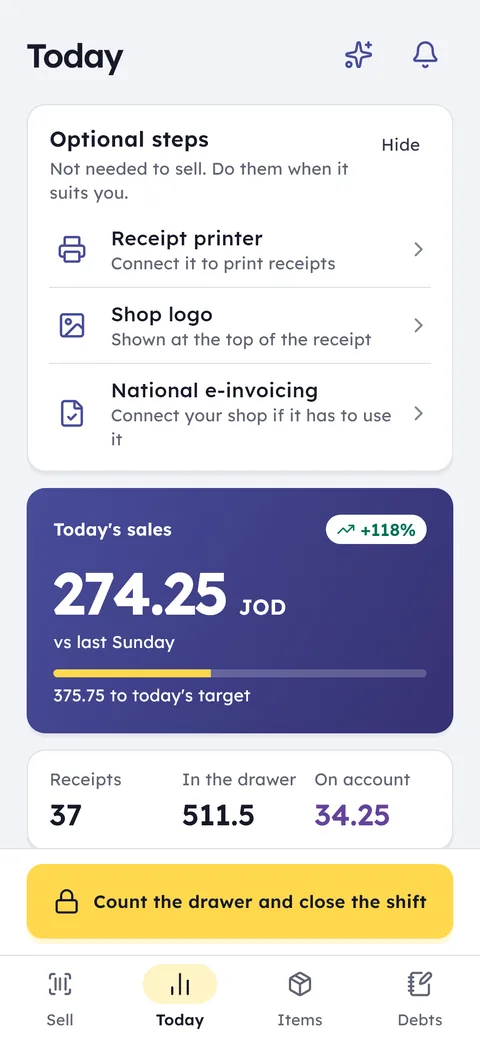
What this feature does: Owner notifications
Sale alerts
For every sale, or for invoices above an amount you set, the moment they are saved.
Daily target
Set a sales target for the day, watch the progress, and get a notification when you hit it.
Sensitive actions
A refund, a void or a large discount by an employee, a new debt, or a cash difference at closing.
Low stock
An alert when an item drops below the minimum you set for it.
Morning brief
At the hour you choose: yesterday's sales, what to reorder, and who owes payments.
Quiet hours
Alerts are kept silent during the hours you set, and waiting for you in the morning.
Someone late
If an employee has not started a quarter of an hour after their scheduled shift, you hear about it.
A device offline
If a selling device is offline for 30 minutes during working hours you know, and its sales stay saved on it.
From the shop menu open Alerts, switch on what matters and off the rest: sales, targets, stock, debts, cash, staff.
The amount worth an alert, the size of a big discount, today's target, the morning brief hour and your quiet hours.
Alerts reach your phone wherever you are, and the app has the full details.
Ghalleh means the day's takings: what actually comes into your shop. Notifications are built so you know every dinar as it arrives, without standing at the counter. Get an alert for every sale, only for invoices above an amount you choose, or each time the day's total passes amounts you set, up to three of them. A daily target shows your progress and tells you when you get there.
Notifications go beyond sales. You hear when an item drops below its minimum, when a new debt is recorded, when an employee makes a refund, a void or a big discount, and when a shift closes with a cash difference. You choose what comes through and what does not, so every alert is worth reading rather than noise you learn to ignore.
- At a family dinner, shop still openOnly big sales come through, so you know the day is going well without calling the cashier.
- A cashier gives a large discountYou get the discount and the employee's name within the minute, so you ask about it today, not at month end.
- 8 am, before you openThe morning brief is on your phone: what you sold yesterday, what is running low, and whose payment is due today.
- You hit today's targetA notification arrives: today's target reached · 500.000 JOD. You know the day went to plan while you are away from the shop.
What reaches your phone
- New sale · 6.450 JOD | 4 items · cashier Samer: for every sale, or only for big ones above an amount you choose.
- A refund or a voided receipt, and a discount above a percentage you set, with the employee's name.
- The daily target reached, and the day's sales passing amounts you choose, up to three.
- A new debt, and a drawer difference when a shift closes short or over.
- Low stock: an item below its minimum.
- Someone late, a quarter of an hour after their scheduled shift starts.
- A selling device offline for 30 minutes during working hours.
- For phone shops: a repair waiting too long, and a used phone bought. For cafés: a table open too long.
- A new device signing in to your shop's account.
The morning brief and the weekly analysis
Turn on the morning brief and pick the hour it arrives. One notification gathers yesterday's sales, the items to reorder and the customers who owe payments, so you start the day knowing where you stand before you reach the shop.
And every Saturday morning the weekly analysis arrives: sales, invoices, average sale and margin against the week before, with practical recommendations for your shop.
Quiet hours
The shop may stay open until midnight, and you still need to sleep. Set quiet hours and alerts during them are kept silent for the morning, except the morning brief, the weekly analysis and a new device signing in.
Tips and messages from Ghalleh itself are limited too: one a day at most, and nothing between 22:00 and 9:00.
A sale sound on your phone
If you would rather hear a sale than read it, turn on the sound for sales from another device and pick the sound. Your phone rings whenever a member of staff sells, from their phone or from the shop PC. These settings are yours alone: what reaches you does not change what reaches anyone else, and every change is saved at once.
Common questions
Will I get a notification for every invoice?
Only if you want to. Choose every sale, invoices above an amount you set, or turn sale alerts off and keep only the daily target and the morning brief.
What is the daily target?
A sales figure you set for the day. You watch progress toward it, and a notification arrives when you reach it.
What is the morning brief?
One notification every morning at the hour you choose: yesterday's sales, what to reorder, and which customers owe payments.
Will alerts wake me up at night?
Not if you set quiet hours. Alerts during them are kept silent for the morning, except the morning brief, the weekly analysis and a new device signing in.
Will I know if an employee gives a big discount?
Yes. Set what counts as a big discount and you hear about any discount above it, and any refund or void, with the employee's name.
Will I know if someone is late for their shift?
Yes. Turn on the late alert and you hear if someone has not started a quarter of an hour after their shift in the weekly schedule.
Open your shop on Ghalleh today.
Download the app, set up your shop yourself and try every feature free for 14 days, with no card.