

Café POS: the details behind the bar
A menu built the way people order
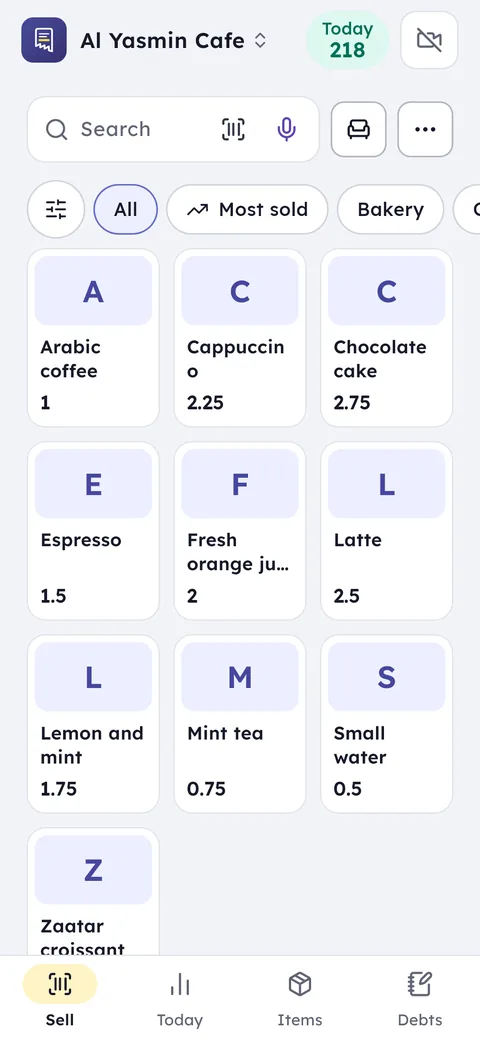
The first job in any café POS is the menu. In Ghalleh you create a drink once, then add its sizes with prices and the add-ons your regulars ask for: an extra shot, oat or almond milk, caramel syrup, whipped cream. Every add-on has its own price, so nobody does the maths in their head during the rush.
Group items the way customers order: hot coffee, iced coffee, tea and herbal, juices, pastries and sweets. When someone asks for a large iced latte with oat milk, the cashier gets there in two or three taps, and the bar slip prints on the shop's printer with the size and the add-on spelled out.
- Size and add-ons on the receipt and on the bar ticket
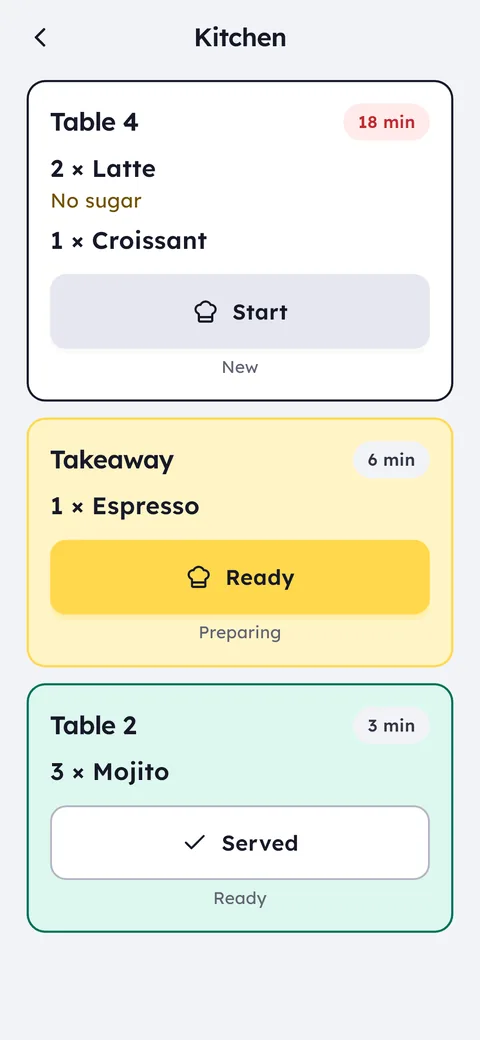
- Notes like "no sugar" or "light ice" ride on the same order
- A photo on every item helps a new hire through their first week
Cost per cup, the number that moves your prices
A latte's price doesn't tell you what you made on it. Give each drink an estimated cost, beans, milk, cup and lid, and update it when your roaster raises prices. Ghalleh works out profit as price minus cost, so at the end of the week you see which drinks carry the café and which eat barista time for nothing.
When you enter a supplier's purchase invoice, the cost of the beans, milk and cups you stock updates, and what you owe each supplier is recorded. You know before month end what you owe the roaster and the cup supplier, without a side notebook.
Milk and the pastries you buy in from a bakery have expiry dates. Record them on the item to see what has to sell today, and at the end of the week how many croissants went unsold, so your next order is based on numbers.
Seated tables inside, takeaway at the counter
Plenty of cafés in Amman and Irbid do both: tables where people stay two hours, and a takeaway queue in the morning. The café type in Ghalleh gives you tables, so you open a table's tab, add to it through the visit, and see the total before anyone asks for the bill. Takeaway is rung up and paid at the counter straight away.
When the table asks for the bill, split it by person or by item, each part paid their own way. If you serve argileh, add it as an item with its price and a head change as another, and it counts in today's sales like any drink.
A small coffee shop, a kiosk or a juice bar: the same POS, smaller
If you run a fresh juice shop or a coffee kiosk on the way to campus, speed matters more than tables. One phone, a small Bluetooth printer and a menu of cup sizes is all it takes. A fruit cocktail juice at its size, with honey, nuts or cream as priced add-ons, and the receipt is out before the blender stops.
If the internet drops at peak hour, Ghalleh keeps selling and printing, then sends and syncs the invoices when the connection is back. The queue doesn't stop because the router did.
When the kiosk grows into a café you don't start over: add a tablet for the counter and staff accounts on the same account, and the menu and numbers stay as they are.
Shifts and the drawer: who opened, who closed, what was off
A café runs two shifts at least, sometimes three. Every barista signs in to their own account, clocks in from their phone only while inside the café, and sees their shift schedule. At close they count the drawer, and if it doesn't match you get an alert with the difference and the name of whoever closed.
- Hours ready for payroll, with advances recorded per person
- Sales per barista, by day or by month
- Every refund or big discount saved in the activity log, with an alert to you
- Permissions per action: who can void, who can discount, who sees profit
Numbers worth a weekly look
A coffee shop POS should do more than print receipts. Once a week, check three things: peak hours, to know when a second barista pays off; best sellers, to know what must never run out; and items unsold for 14 days, to know which seasonal drink should come off the menu.
Compare today with yesterday, and keep an eye on the café's best day on record. Break it on the first cold Friday of winter and you get an alert, which tells you the hot drinks menu landed on time.
Regulars, their points and a receipt on their phone
Paper stamp cards are lost within a week. In Ghalleh every regular has a profile that collects loyalty points on each bill, to use on a later visit, and shows what they usually order.
If a customer wants the receipt on their phone instead of paper, send it on WhatsApp from the payment screen, or let them scan the digital receipt code with their camera.
A QR menu on the tables
Switch on the QR menu in the selling settings and put the code on your tables: guests open the café's menu on their phone and see the items and prices. The menu is view only: orders still go through the cashier or the waiter, so nothing reaches the bar that nobody has seen.
In the same settings you set a service charge on tables if you take one, added to table bills only, never to takeaway.
Café POS options in Jordan compared
Before you choose café POS software, compare what each company publishes on its own site, not what a salesperson says on the phone. Here is what we found published for two systems that come up often when Jordanian cafés search, next to Ghalleh.
| System | Published price for Jordan | JoFotara on its site |
|---|---|---|
| Ghalleh | From 5 JOD a month, or 35 JOD a year for Start and 99 JOD for Pro | Connected, with a QR code on every receipt |
| Kairos | 240, 380 or 540 JOD a year depending on the plan | Its site mentions the link |
| Foodics | Its site shows no prices for Jordan | Not mentioned on its site |
From each company's own pages as published, checked in October 2026. Prices change, so check each site before you decide.