
What this feature does: Invoicing
Continuous scanning
Scan item after item with the phone camera or a USB or Bluetooth barcode scanner. Prices fill in themselves.
Voice selling
Press and hold, then say: two milk and a bag of sugar. The items appear with their quantities for you to check before they go on the sale.
Discounts and returns
Discount one line or the whole invoice. Return all of it or part, one piece of six or half a metre, as cash or store credit.
Split payments
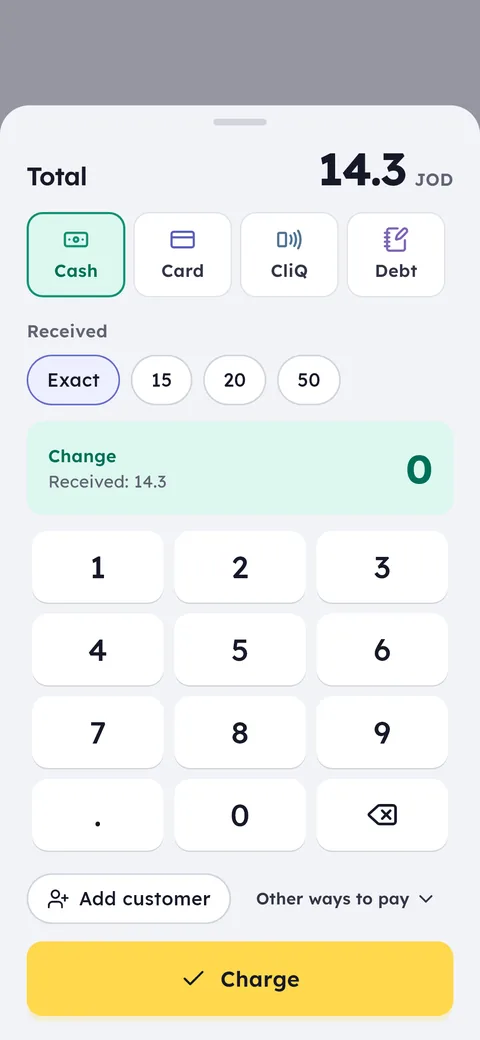
Part cash, part card, CliQ or customer debt, all on one invoice.
Connected to JoFotara
Every invoice is sent to the national e-invoicing system, and failed sends are retried automatically.
Quotations and delivery notes
From the selling screen, send a PDF quotation with unit prices and a valid-until date, or a delivery note with no prices and a line for the receiver to sign.
Receipts with your shop's details
Your shop's phone, address and tax number, the unit price on every line, and a footer line you write, such as your return policy.
Receipts on the customer's phone
No printer, or a customer who does not want paper? Send the receipt on WhatsApp with the items and the total.
Camera, scanner, search by name or brand, or your voice. Quantity and price appear, and you can change either.
Cash, card, CliQ or debt. Split the total across more than one if needed.
An Arabic thermal receipt from a Bluetooth printer, a POS terminal or a PC printer, or a WhatsApp message to the customer.
The invoice is the thing you do more than anything else all day. So the selling screen in Ghalleh is built to be fast on a phone, a tablet and a PC: continuous scanning, search by several words across the item name and brand, keyboard shortcuts on the Windows version, and discounts per item or per invoice. Every sale deducts stock the moment it is saved, so you never update quantities by hand.
Every invoice is sent to Jordan's national e-invoicing system, JoFotara, and its QR code prints on the thermal receipt. If the internet is down or a send fails, Ghalleh retries automatically: 8 quick tries, then every 6 hours for 7 days. If an invoice still cannot be sent, it is marked and you get an alert. At the end of the day every invoice is searchable by number, date or customer name, from any device on your account.
Besides the invoice, Ghalleh produces three documents a shop needs. A quotation goes out as a PDF with unit prices and a valid-until date, and stays saved until the customer comes back. A delivery note travels with the goods without prices, with a line for whoever receives them to sign. And when a customer pays toward their account, they get a payment voucher with the amount and the balance left. On a sale on account the receipt shows the customer's balance after it, and in phone shops the warranty end date prints next to the IMEI.
- The 8 pm queueFive customers waiting. Continuous scanning rings up a full basket in seconds, so the line moves instead of growing.
- An order while you bag the last oneSay the items instead of searching for each one, then check them at a glance before they go on the sale.
- A return two days laterFind the invoice by number or date, return just that item, and stock and cash adjust with no side maths.
- The internet drops at rush hourSelling carries on. Invoices are saved on the device and sent to JoFotara when the connection comes back.
- A contractor asks for a quoteBuild the list on the selling screen and send a PDF quotation with a valid-until date. He comes back a week later ready to buy, and the saved quotation becomes a sale in one tap.
Sales invoices and e-invoicing in one step
Every sale in Ghalleh is a complete sales invoice: its number and date, the items with their prices and tax, the payment method, and the cashier who issued it. Connect your shop to JoFotara once from the shop menu, and Ghalleh sends each invoice by itself after it is saved, with the invoice's QR code on the receipt.
You never pick the invoice type by hand. A cash sale reaches JoFotara as a cash invoice, a sale on credit (in full or in part) as a receivable invoice, and a return as a credit note tied to its original invoice at the same prices. The payment method you chose at the till decides it.
On trade accounts the invoice carries the buying company's name and tax number, priced at the trade price you set for each item. Reports show where every invoice stands: sent, waiting for a connection, or needing your attention.
Voice selling: say the items and they go on the sale
At rush hour, or with your hands full, press and hold Say the items and talk the way you talk to customers: two Almarai milk, a bag of sugar and a pack of tea. Ghalleh understands everyday Arabic as people speak it in Jordan, and shows the items with their quantities for you to check before they go on the sale.
Anything Ghalleh is not sure about appears as its own line, where you pick the item or remove it, so nothing lands on the sale that you have not seen. You can ask for a price by voice too: say how much is the tea? and its price shows without being added.
AI voice reading needs the internet, and each plan includes a monthly allowance: 600 voice orders on Start, 1,500 on Pro and 50 in the free trial. If the internet drops or the allowance runs out, the phone reads the order itself, so voice selling stays available.
Common questions
Is invoicing connected to JoFotara?
Yes. Every invoice is sent to the national e-invoicing system and its QR code prints on the receipt. If a send fails, Ghalleh retries automatically and alerts you if an invoice still cannot be sent.
Do I need a special printer?
No. Ghalleh works with Bluetooth thermal printers, POS terminals with a built-in printer, and USB printers on a Windows PC. No printer at all? Send the receipt to the customer on WhatsApp.
How does voice selling work?
Press and hold Say the items, say the items and quantities the way you normally would, then check what Ghalleh understood and add it to the sale. Each plan has a monthly allowance of AI voice orders; when it runs out or the internet drops, the phone reads the order itself.
Can I sell on credit from the invoice screen?
Yes. Choose debt as the payment, for all or part of the total, and the amount goes on the customer's account with a due date. The invoice reaches JoFotara as a receivable invoice.
Can I give a customer a quotation?
Yes. From the selling screen, create a PDF quotation with unit prices and a valid-until date, then send or print it. The quotation stays saved, and when the customer agrees it becomes a sale in one tap.
Does the JoFotara invoice show the buying company?
Yes, for trade accounts. The invoice sent to JoFotara names the buyer and carries their company's tax number.
Can I return part of a line?
Yes. Return one piece of six or half a metre off a roll, and give the money back in cash or as store credit for their next purchase. The return reaches JoFotara as a credit note tied to its invoice.
Can I search by item name and brand together?
Yes. Type two or more words, such as milk Almarai, and you get the items that have every word in their name or brand, in any order. Barcodes can be typed in Arabic or Western digits.
Open your shop on Ghalleh today.
Download the app, set up your shop yourself and try every feature free for 14 days, with no card.