
Download Ghalleh POS for Android and Windows
Download the Ghalleh POS app for Android from Google Play, for phones, tablets and POS terminals that have Google Play, or download the Windows version for your PC from this page. One shop account, and 14 days free with every feature. iPhone and iPad are coming soon.
iPhone and iPad are coming soon. Today you can use Ghalleh on an Android phone or tablet, or on a Windows PC.
- Free to download, with 14 days free on every feature and no card
- Sign in with your mobile number and a code by text message, no password
- Pick your plan inside the app whenever you decide, and cancel any time from Google Play
Scan the code with your phone camera to open Ghalleh on Google Play.
Install steps
On an Android phone or tablet
- 1Tap the Google Play button on this page, or search for Ghalleh on Google Play.
- 2Install Ghalleh, open it and sign in with your mobile number and the code sent by text message.
- 3Create your shop: name, type and city. Your 14-day free trial starts right away.
- 4Add your items with the phone camera or from an Excel or CSV file, and in a supermarket or grocery pick from about 388 ready items, then start selling.
See Ghalleh in two minutes.
From setting up the shop and the first sale to debts, staff and stock, and the alert that reaches your phone with every sale.
The complete Ghalleh user guide (PDF)
The app step by step, with screenshots: signing in, setting up the shop, items, selling, debts, reports and shifts, and what differs for each kind of shop.
What reaches your phone from day one

Ghalleh on a Windows PC
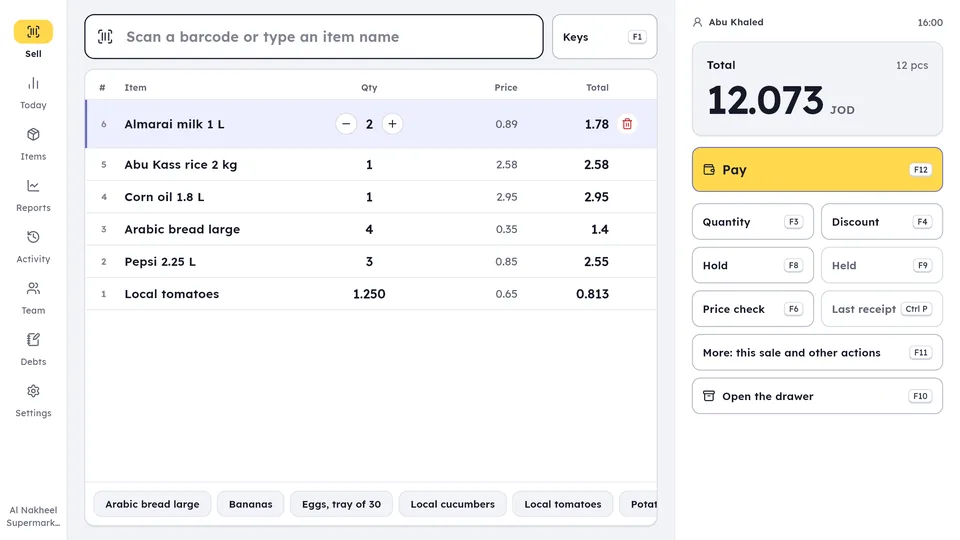
The PC version on the same shop account: sell with the keyboard and a barcode scanner, print on a receipt printer, and keep selling without internet. A Bluetooth or USB scanner adds the item to the sale from anywhere on the selling screen, with no need to click the search box first. Everything you sell on the PC shows on your phone instantly. Start on your phone: get Ghalleh on Google Play and create your shop, then install the PC version and link it to your shop with a code from your phone.
Windows 10 (version 1809 or newer) or Windows 11, 64-bit. Check your device
Technical details
The file's SHA-256 fingerprint
Anyone can use it to check that the file they downloaded is ours, unchanged.
Install
- 1Download the installer on the PC, then open it from your Downloads folder.
- 2If the blue "Windows protected your PC" window shows, click More info, then Run anyway. It shows once, because the installer is not code-signed yet.Windows protected your PCMore info1Windows protected your PCRun anyway2Don't run
- 3Allow Windows to install it and finish the steps. Ghalleh opens at the end.
Link the PC to your shop
- 1On the owner's phone, open Devices, then Link a PC. A code starting with GH appears, valid for 15 minutes.
- 2On the PC, open Ghalleh, choose I have a link code, type the code, then the PIN. The PC stays linked until you sign it out from Devices on your phone.
- 3Import your items from an Excel or CSV file if you have one, then ring up a test sale and print its receipt.
Does Ghalleh run on your device?
A quick check in your browser, with nothing to download. Nothing leaves your device: the whole check runs on it.
System requirements
The PC version
- Windows 10 or 11, 64-bit
- 4 GB of RAM or more; Ghalleh uses about 300 MB
- A processor with 2 cores or more
- Internet for the first link to your shop account, then it works offline
It also runs on any Android 7 or newer phone, and on tablets.
Get the phone app on Google Play:
Optional hardware that works with Ghalleh
Thermal printer
Bluetooth, 58 or 80 mm, and USB printers on a Windows PC.
Barcode scanner
Bluetooth with a phone or tablet, USB with a POS terminal or a PC, or just the phone camera.
Kitchen and bar orders
In a café, each order prints a separate slip for the kitchen and the bar on the shop's printer, and a kitchen screen on a tablet shows orders live.
POS terminals
Android POS terminals that have Google Play, with a built-in printer, such as Sunmi and iMin.
Common questions
Is Ghalleh free to download?
Yes. The download is free, and the first 14 days are free with every feature and no card. Then you continue on a monthly or yearly plan in dinar, or one payment for three years, paid only through Google Play. If you do not subscribe, the shop becomes read only and your data stays saved.
Which devices does Ghalleh run on?
Android phones and tablets and Android POS terminals that have Google Play, and Windows PCs from the Windows section of this page. iPhone and iPad are coming soon. All on one shop account.
How do I start after downloading?
Open Ghalleh, sign in with your mobile number and the code sent by text message, then create your shop in a few minutes, and your 14-day free trial starts. Your staff join with a QR invite and their own PIN.
Is there a Ghalleh APK?
No. On Android, Ghalleh comes from Google Play only, so you get the original app and its updates automatically. For a PC, the Windows installer is in the Windows section of this page, with its SHA-256 fingerprint to check it.
Does Ghalleh run on iPhone?
The iPhone and iPad version is coming soon, and Ghalleh will announce it on its official profiles. Until then, you can sell today on an Android phone or tablet, or on a Windows PC.
Do I need someone to set up my shop?
No. You create your shop yourself inside the app in a few minutes and add items with the camera or from an Excel file. For any question, tap Ask Ghalleh on the site or open the help inside the app.
Do I need the internet all the time?
No. Selling continues when the internet drops, and invoices are sent to JoFotara automatically when the connection is back.