
Features
Shop expenses and daily cash drawer management
Know the drawer total before you count it: every sale and expense lands in the shift balance as it happens, and at closing any gap goes straight to your phone.
What this feature does: Expenses and cash
Drawer balance
Expected cash is worked out from sales, refunds and expenses across the whole shift.
Daily expenses
Electricity, delivery, tea for guests: each expense is logged with a category and taken off the day.
Open and close shifts
Each shift starts with an opening float and ends with a drawer count, under the cashier's name.
Cash differences
If the count does not match, you get an alert with the amount and who held the drawer.
Count note by note
Tap each note and coin as you count, and the total and any gap show before you close the shift.
Upcoming expenses
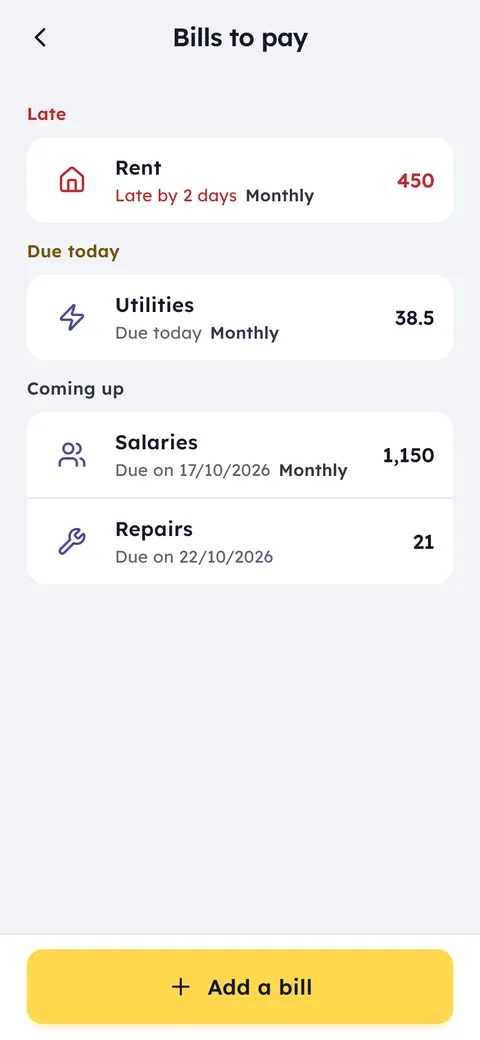
Rent, electricity and subscriptions with their dates, so you see what is due today and what is late.
The cashier enters the change float in the drawer at the start, or the shift opens with the first sale.
Any money taken from the drawer is recorded with a reason and category, so it never vanishes.
Count the drawer note by note. Ghalleh checks it against the expected figure, saves the report and prints the summary.
A loose drawer hides small leaks that add up: an expense no one wrote down, the wrong change given, money no one can account for. In Ghalleh a shift opens with a starting float, and every sale, refund and expense is counted as it happens, so you always know how much should be in the drawer at any point in the day.
At closing the cashier counts the drawer and enters the amount, and Ghalleh compares it with the expected figure. If there is a difference, your phone gets a notification with the amount and the employee's name. Because expenses and sales sit in the same books, you see what the day really left you, not just what came through the till.
- Ten dinars short at closingYou see which shift it happened on and who held the drawer, instead of doubting everyone.
- You paid the delivery driverLog it as a drawer expense, so the drawer does not look short at closing and the money is accounted for.
- Two shifts a dayEach cashier hands over with a clear count, and the next shift starts from a known amount, not a guess.
- Rent is due in two daysIt is on your upcoming expenses, so you get the money ready and pay it from the drawer or from outside it, recorded on the day.
Count the drawer note by note
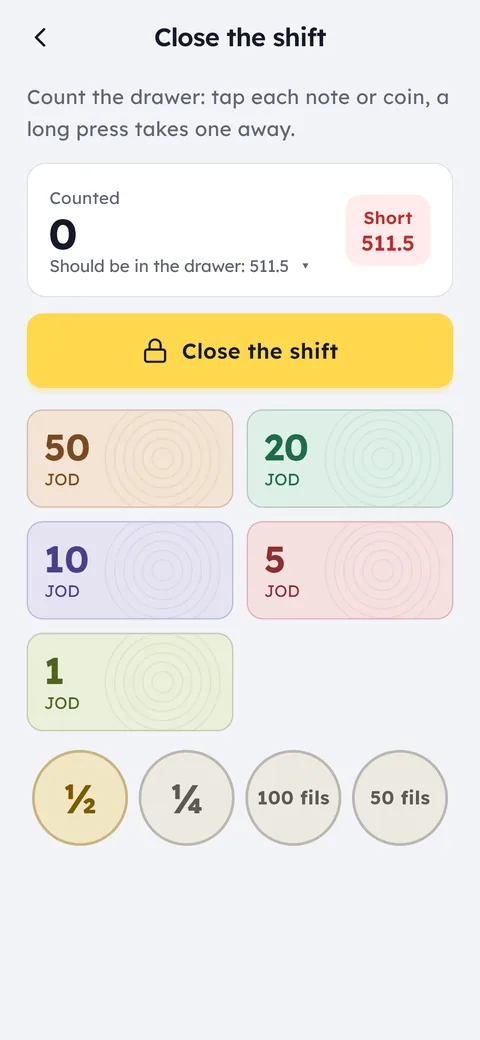
In the evening tap Close the shift, then tap each note and coin you count: the twenties, the fives, the dinars and the small coins. The total builds as you go and any gap from the expected amount shows at once, so you recount before saving instead of finding the mistake tomorrow.
After closing, print the shift summary. Every shift's report stays saved under whoever held the drawer, with what was counted and any difference.
Cash in, cash out, and expenses
Not every amount that leaves the drawer is an expense. When you take cash to the bank, or add change from your own pocket, record it as cash in or cash out with no sale. What the drawer paid for the shop itself, such as delivery, tea for guests or the electricity bill, you record as an expense with its category.
That way the drawer matches reality at closing, and reports show expenses as a share of sales and the net for the day and the month.
A drawer difference: approve it or take it from pay
When a shift closes short or over, you get a notification with the amount and the cashier's name, and the difference waits for your approval. You choose: approve it as it is, approve and take the shortage from the employee's pay this month, or approve and let it go this time.
Approval does not change what was counted, and it is recorded under your name with the time. Taking it from pay applies to shortages only, and it shows on the employee's payroll.
Upcoming expenses
Rent, electricity, water and subscriptions are costs you know in advance. Add them as upcoming expenses with their amount and date, and make them monthly if they repeat. Ghalleh shows what is due today, what is due tomorrow and what is late, and when you pay you choose from the drawer or from outside the drawer, so the expense lands on the right day without upsetting the shift count.
Common questions
Can more than one cashier work in a day?
Yes. Each cashier has their own shift with its own opening and closing, so every shift's balance and differences are kept separate.
Will I know about a difference if I am not in the shop?
Yes. The cash difference notification reaches your phone when the shift closes, wherever you are, and the difference waits for your approval.
Do expenses show up in my reports?
Yes. Sales, expenses and the day's net appear in the same report, with expenses as a share of sales.
What do I record when I take money from the drawer that is not an expense?
Record it as cash out, such as money you take to the bank. Cash in is for what you add to the drawer without a sale, such as change at the start of the day.
Can I take a drawer shortage from an employee's pay?
Yes. When you approve a difference that is short, choose approve and take from pay, and the shortage comes off that employee's pay for the month.
Open your shop on Ghalleh today.
Download the app, set up your shop yourself and try every feature free for 14 days, with no card.