
Skip to content
Ghalleh

Laundry and dry cleaning POS, from drop-off to pickup

Ring up each piece at its own price, send the receipt to the customer on WhatsApp, and know at pickup whether the order is paid.

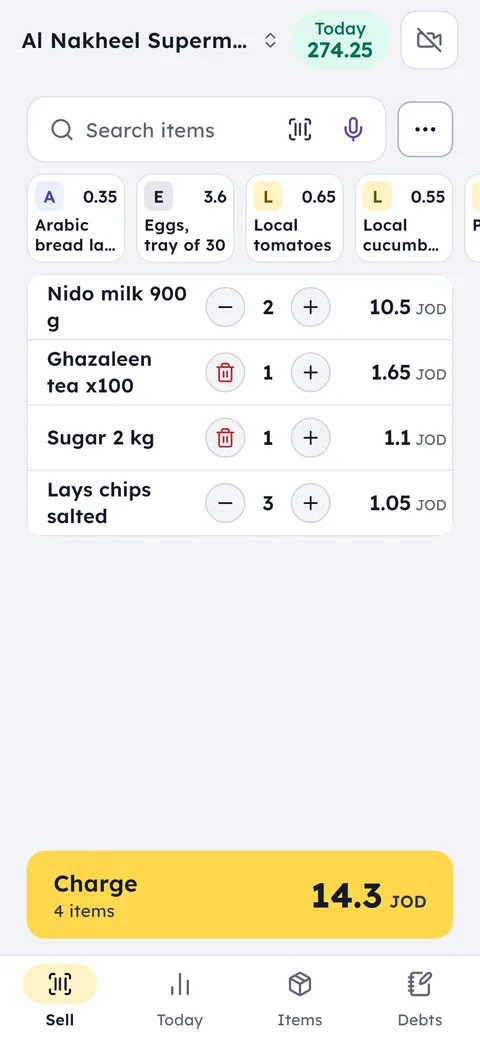
The Ghalleh selling screen: a sale with milk, tea, sugar and crisps, total 14.300 JOD

Your day with Ghalleh

  1. 08:00Opening upYour phone shows the orders due for pickup today, and what their owners still owe.
  2. 10:30A customer drops off a bagFive shirts and a suit on one bill at the price of each piece, and the balance goes on their profile with the pickup date.
  3. 16:00The order is readyYou send the customer a WhatsApp reminder that the order is ready, with the balance due.
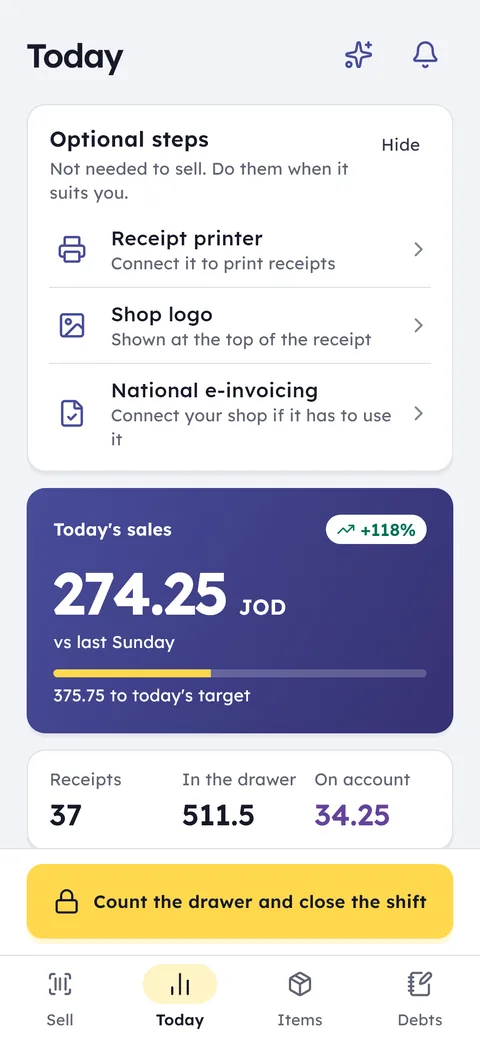
  4. 21:00Evening closeThe shift closes and you see today's takings, and the total still owed on orders nobody has collected.
The Ghalleh Today screen: today's sales against last week, the cash in the drawer and the number of invoices

With Ghalleh

  • Search by name or invoice number and find the order in seconds
  • Every unpaid order is a balance on the customer's profile until pickup
  • A saved price for every piece and service, and the bill adds itself up
  • A WhatsApp reminder brings the customer back for their clothes

A price per piece

Shirt, trousers, suit, blanket: every piece and service with its own price, whether it's washing, ironing or dry cleaning.

Order search

Search by customer name or invoice number to see what they dropped off, when, and what they owe.

Pay on pickup

The customer pays now or pays part, and the rest sits on their profile with the pickup date until it's settled.

WhatsApp for customers

The receipt reaches the customer on WhatsApp at drop-off, and a reminder follows when the order is ready.

Order number and ready time

Every order gets a number, a ready day and hour, and a printed claim slip the customer brings back.

A numbered tag per piece

Each piece gets its own numbered tag, so one customer's shirt never ends up in another's bag.

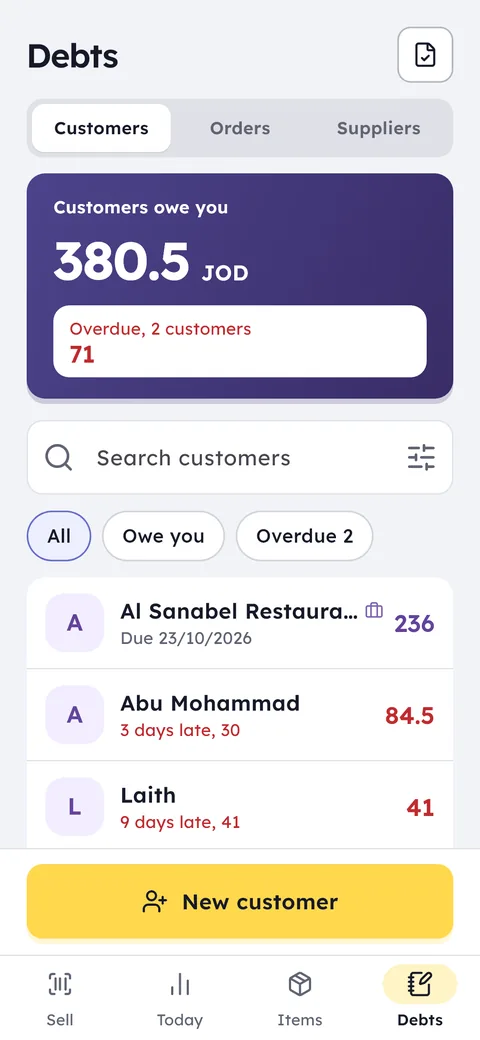
The Ghalleh debt book: what customers owe you in total, and who is late

The Ghalleh debt book: what customers owe you in total, and who is late

The laundry guide

A service list: every piece at its price

A laundry doesn't sell goods off a shelf; it sells a service on a piece. So each service is an item with no stock and its own price: shirt wash and iron, trousers press only, suit dry clean, evening dress, blanket, curtain by the metre. The services show as buttons on the selling screen: tap shirt three times and suit once, and the bill adds itself up.

Express service is another item with its own price, added when a customer wants their clothes the same day, so the surcharge is never a guess. Detergents or hangers sold at the counter are ordinary items with stock and barcodes.

  • Name each service the way customers say it: shirt wash and iron, not service number 4
  • Change prices from your phone and every device in the laundry has them at once

Drop-off with a claim slip and an order number

When a customer hands over a bag of clothes, tap the services for each piece, then Order with deposit from More: pick the customer, the ready day and hour, and enter the deposit if they paid one. The order note holds anything about the pieces: a stain on the collar, a missing button, a delicate fabric.

When you save, a claim slip prints for the customer with the order number, the pieces and the pickup time, and a tag prints for each piece with the same number, so one customer's clothes never get mixed with another's on the pressing rail.

Pay upfront or at pickup

Some customers pay everything at pickup, some pay a deposit, and a regular may pay nothing until they're back. It's all on the order: the total, the deposit and what's left. At pickup you tap Hand over, the deposit is counted, and the customer pays the rest in cash, by card or CliQ.

If an order is cancelled before the work is done, you give the deposit back the way it was paid, in cash, to the card or by CliQ, so the drawer still matches.

Ready orders and late ones

The orders list in Ghalleh shows ready orders first, then the rest by the time you promised. When a customer's clothes are ready you tap Ready and tell them on WhatsApp from their page, with the amount still due.

An order not collected on time is marked Late, so you know which clothes have been waiting for days before the rail fills with bags nobody can place. When the customer comes back, search by slip number or name and their order is there in seconds.

Every morning the To prepare list shows what has to be ready today and tomorrow, by the hour, so you split the washing and pressing before the rush starts.

Hotels and businesses on a monthly account

If the laundry serves serviced apartments, an office or a salon that sends its towels every week, make each one a trade account with payment terms. Every delivery is an invoice on its account, and payments are recorded as they come in.

At month end you send each account a statement with dates and amounts, and you see the total all accounts owe you in one number.

Staff, shifts and what reaches you away from the shop

Every employee has their own PIN and permissions: who takes in and hands over, who can discount, who can cancel an order. They clock in from their phone inside the laundry, and each shift closes with a drawer count; if there's a difference you're notified with their name.

At home you get a notification for every sale, and you see what came in today and how much money is still sitting on orders nobody has collected.

JoFotara for laundries and dry cleaners

If you need e-invoicing software for a laundry, the official invoice should come from the same screen where clothes are taken in and handed over, not from a second program. In Ghalleh the laundry's invoices go to JoFotara from the till itself, the QR code prints on the receipt, and the deposit and balance stay on the order.

If the internet drops, drop-offs and pickups carry on and the waiting invoices are sent when the connection returns. A trade account that pays monthly gets invoices with its name and tax number when they're on its profile.

How the link works, step by step: JoFotara integration.

Common questions

Questions about the free trial, the PC version and prices are answered in the FAQ and on the pricing page. Looking for free POS software? Here is what you get free and what you pay for.

How does a customer know when to collect their clothes?

At drop-off they get a printed claim slip with the order number, the pieces and the ready day and hour, and every piece carries a tag with the same number. When the order is ready you tell them on WhatsApp from their page.

A customer pays a deposit and the rest at pickup. How do I record it?

At drop-off choose Order with deposit and enter what they paid. At pickup tap Hand over: the deposit is counted and they pay the rest in cash, by card or CliQ.

How do I see clothes nobody has come back for?

Every order past its time and not collected is marked Late in Orders, so you know whom to remind, and you can search by slip number or the customer's name.

Serviced apartments send laundry every week. How do I bill them?

Make them a trade account with payment terms: each batch is an invoice on their account, and at month end you send them a statement with dates and amounts.

Open your shop on Ghalleh today.

Download the app, set up your shop yourself and try every feature free for 14 days, with no card.

WhatsAppCall
WhatsApp0778712927
Ask Ghalleh
Hi. Pick a question and I will answer from Ghalleh's own information.
Rather talk to us directly?
Call 0778712927