
Ghalleh or a traditional cash register: which one for your shop?
The traditional cash register has served shops for decades. Here is how it compares with a POS that runs on your phone, tablet and PC.
| Ghalleh | a traditional cash register | |
|---|---|---|
| JoFotara e-invoicing | Every invoice goes to JoFotara, with a QR code on the receipt | A standalone register does not send invoices to it |
| Speed at the counter | Barcode scanning by camera or scanner, receipt printed or on WhatsApp | Quick keys, a receipt and a cash drawer, barcode depends on the model |
| Stock | Goes down with every sale, with a low-stock alert | Most only record sales, stock counting is up to you |
| Customer debts | Partial payments, due dates, statements and reminders on WhatsApp | Not recorded, so they live in a separate notebook |
| Following up from outside the shop | Every sale shows on your phone the same second | You read the end-of-day report at the register |
| Totals and profit | Today's total, profit and best sellers ready with no sums | End-of-day totals report, without item cost |
| Staff | An account per employee with permissions, and a log of sensitive actions | Cashier numbers on some models |
| Cost | In JOD: 5 a month, 35 a year or 79 once for three years, after 14 days free with no card | A one-time price for the machine, no subscription |
| Good fit for | A shop that wants to know its takings every day, from anywhere | A shop that only needs to record sales and print a receipt |
This compares standalone traditional cash registers in general, and specifications vary by model.
Before you choose, see POS prices in Jordan and what JoFotara integration means in practice.
The traditional cash register deserves its respect. It is sturdy, its keys are fast and cashiers learn them in days, it prints a receipt and opens the drawer, and it runs for years without internet. You pay for it once with no subscription, and at closing it prints your totals report. For a shop that needs to record sales and print a receipt and nothing more, it is a machine that does its job reliably.
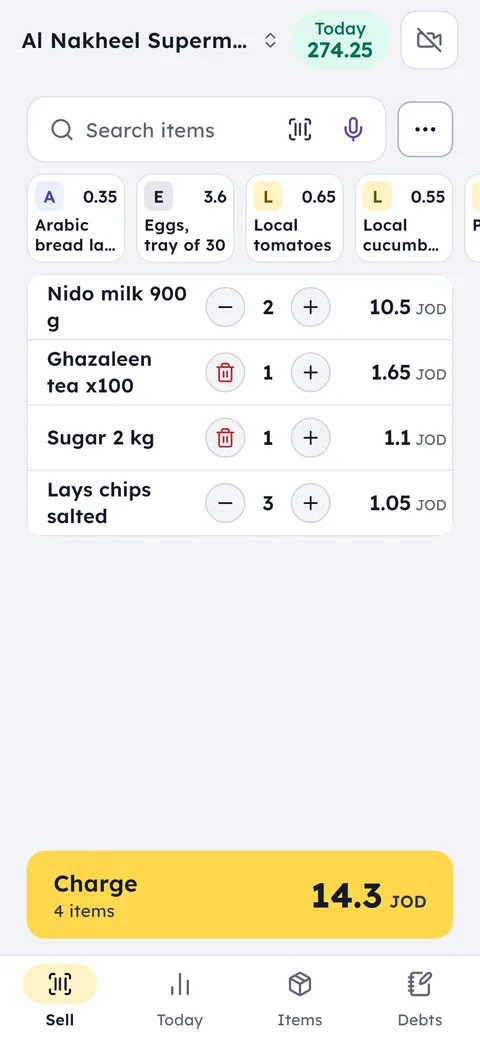
What the register does not do is everything after the sale. It does not send the invoice to JoFotara, it does not know an item's cost to work out your profit, it does not record a customer's debt, and it cannot tell you what is happening in the shop while you are out. Ghalleh runs on an Android phone, a tablet, a Windows PC or an Android POS terminal with a built-in printer: it scans barcodes, prints an Arabic receipt with the JoFotara QR code, opens a cash drawer connected to the printer, brings stock down and records debts. And your phone gets a notification for every sale, and for any cash difference when a shift closes. If you are comparing with a cashier device at about 500 JOD: it is paid once, then it ages with no new features, and its records can go with it if it breaks. Ghalleh runs on the phone you already have, at 79 JOD paid once for three years, with updates, JoFotara e-invoicing and data kept in the cloud. With a 45 JOD Bluetooth printer that comes to about 125 JOD, roughly a quarter of the device's price.
Which one fits you?
A traditional register is enough if
All you need is to record sales, print a receipt and open the drawer, and you do not need JoFotara or any tracking of stock and debts.
Ghalleh fits if
You want a POS that sends the JoFotara invoice, knows your stock, profit and customer debts, and tells you on your phone what happens while you are away.
Moving to Ghalleh
Print or copy the list of items and prices programmed on the register's keys, and add barcodes where they exist.
Install Ghalleh from Google Play on an Android phone, a tablet or a POS terminal with Google Play such as Sunmi or iMin, or the Windows version on the counter PC, and connect a 58 or 80 mm thermal printer.
Enter your items or import them from an Excel or CSV file, then start selling by scanning or searching, and print your first receipt with a QR code.
Common questions
Do I need to buy a cash register to use Ghalleh?
No. An Android phone, a tablet or a Windows PC is enough, and you can add a Bluetooth thermal printer (58 or 80 mm), a USB printer on the PC, or use the built-in printer of an Android POS terminal such as Sunmi or iMin. iPhone and iPad are coming soon.
Does a traditional cash register send invoices to JoFotara?
A standalone traditional register does not, so you need to issue invoices somewhere else. In Ghalleh every invoice is sent automatically and the QR code prints on the receipt.
Does Ghalleh work when the internet drops, like a register?
Yes. Selling and printing continue without internet, and when the connection returns sales sync and invoices go to JoFotara automatically.
Open your shop on Ghalleh today.
Download the app, set up your shop yourself and try every feature free for 14 days, with no card.