
Ghalleh or Inyad: a Mahaal alternative in Jordan
The Mahaal app is now part of Inyad. If you are looking for an alternative in Jordan, here is a straight comparison of the two.
| Ghalleh | Inyad (Mahaal) | |
|---|---|---|
| JoFotara e-invoicing | Connected, with a QR code on every receipt | Does not name Jordan's JoFotara |
| Works offline | Yes, invoices are sent automatically when you reconnect | Yes, sell, print and take payment offline, syncs later |
| Devices | Android phones and tablets, Android POS terminals with Google Play, and Windows PCs. iPhone and iPad coming soon | Android or Windows, plus payment terminals |
| Language | Arabic first, invoices in dinar | Arabic, English and French |
| Published price | In JOD: 5 a month, 35 a year or 79 once for three years, after 14 days free with no card | A free version, no Jordan pricing page |
| Staff and attendance | Permissions per employee and clock-in at the shop, in every plan | Staff and payroll |
| Branches | One branch on Start, two on Pro, with stock transfers between them | Supports several locations |
| Owner notifications | Every sale, today's target, low stock, cash differences | Not stated on the pages we checked |
| Good fit for | Shop owners in Jordan used to selling from the phone | Merchants outside Jordan who want to start free |
Sources: inyad.com/ar/pos-system-software, and mahaal.app, which sends visitors to Inyad. Checked October 2026. Details may change, and the vendor's site is the reference.
Before you choose, see POS prices in Jordan and what JoFotara integration means in practice.
The Mahaal app that many shop owners knew is now part of Inyad, and the Mahaal site sends visitors to Inyad. Inyad's POS runs on Android or Windows, and its page says you sell, print and take payment offline while the data syncs by itself later. Its free Konnash app keeps a debt book with WhatsApp payment reminders. Its idea of starting on the phone and moving up to a full counter later is clear and reassuring for a shop owner.
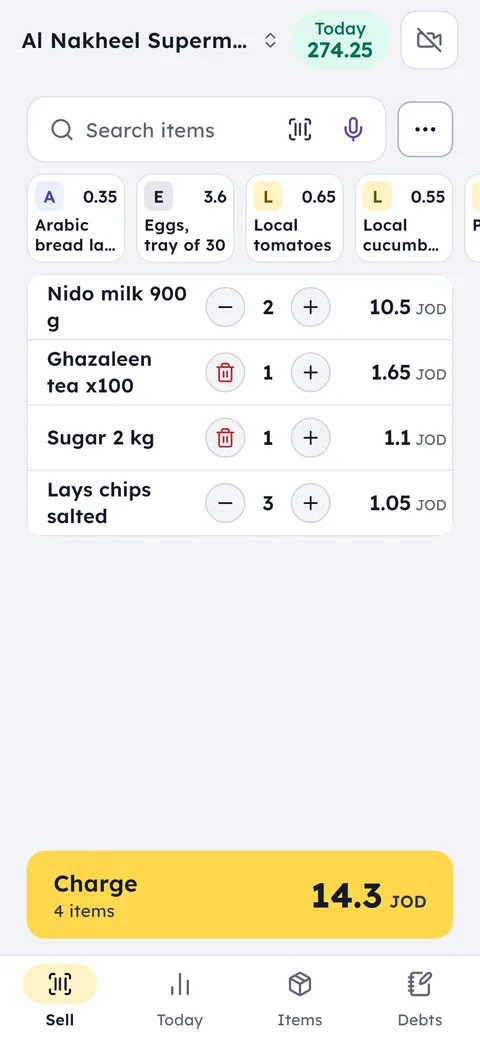
If you are looking for a Mahaal alternative in Jordan, the first question is JoFotara. The Inyad pages we checked do not mention Jordan's national e-invoicing system and show no prices for Jordan. In Ghalleh every invoice is sent to JoFotara with the QR code on the receipt, and prices are published in dinar. The idea you liked in Mahaal stays the same: your phone is the cashier, you sell without internet, and you keep a customer debt book. On top of that you get an owner notification for every sale and for today's target. Ghalleh runs on Android phones and tablets and on Windows PCs, and iPhone and iPad are coming soon.
Which one fits you?
Inyad fits if
You work outside Jordan or do not need JoFotara, and want to start on a free version with a free debt book.
Ghalleh fits if
You used the Mahaal app in Jordan and want the same way of working with JoFotara, prices in dinar, and a notification on your phone for every sale.
Moving to Ghalleh
If your Mahaal or Inyad account lets you export products, save them to a file. If not, type them into a sheet: name, barcode, price and quantity.
On the items screen choose import and load the file as it is, Excel or CSV, up to 20,000 rows. Ghalleh matches the columns itself and shows you the rows to review before saving. Your existing barcodes keep working in Ghalleh, so no new labels are needed.
Add your credit customers in Ghalleh and record what each one still owes.
Common questions
What happened to the Mahaal app?
The Mahaal site now shows a notice that it has become part of the Inyad site, and sends visitors there. For details about your old account, check with Inyad directly.
Is Ghalleh a Mahaal alternative in Jordan?
Ghalleh offers the same idea: your phone is the cashier, you sell offline, and you keep a customer debt book. It adds a JoFotara connection with a QR code on the receipt, a Windows PC version, and prices published in dinar.
How do I move my products from Mahaal to Ghalleh?
If you can export your product list, import the file into Ghalleh as it is, Excel or CSV. If not, type it into a sheet with name, barcode, price and quantity. Ghalleh matches the columns itself and shows the rows for review before saving.
Open your shop on Ghalleh today.
Download the app, set up your shop yourself and try every feature free for 14 days, with no card.