
Ghalleh or Excel: when is a spreadsheet enough?
Many shops start on an Excel sheet, and it is a smart start. Here is when the sheet is enough and when your shop has outgrown it.
| Ghalleh | Excel | |
|---|---|---|
| JoFotara e-invoicing | Every invoice goes to JoFotara, with a QR code on the receipt | Not connected, each invoice is issued by hand on the JoFotara portal |
| Speed at the counter | Barcode scanning by camera or scanner, receipt printed or on WhatsApp | Type each sale in a new row, no receipt for the customer |
| Stock | Goes down with every sale, with a low-stock alert | Adjust quantities by hand after each sale or at closing |
| Customer debts | Partial payments, due dates, statements and reminders on WhatsApp | A column per customer, reminders are up to you |
| Following up from outside the shop | Every sale shows on your phone the same second | Only if the file is in the cloud and someone has updated it |
| Totals and profit | Today's total, profit and best sellers ready with no sums | Formulas you write yourself, which break if a row is deleted |
| Staff | An account per employee with permissions, and a log of sensitive actions | One file everyone edits, no per-action permissions |
| Cost | In JOD: 5 a month, 35 a year or 79 once for three years, after 14 days free with no card | Software you may already have on your computer |
| Good fit for | A shop that wants to know its takings every day, from anywhere | Analysis and planning, or a shop with few sales a day |
This compares the common way of running a shop on Excel sheets, not Excel itself.
Before you choose, see POS prices in Jordan and what JoFotara integration means in practice.
Excel is a great tool, and it is natural for a shop owner to start with it. You already know it, you design the sheet your way, and you can work out anything in it: margins, supplier comparisons, next season's buying plan. Many owners keep a tidy item list in Excel with names, prices and barcodes, and that list is ready to import. For analysis and planning, Excel is still one of the strongest tools around.
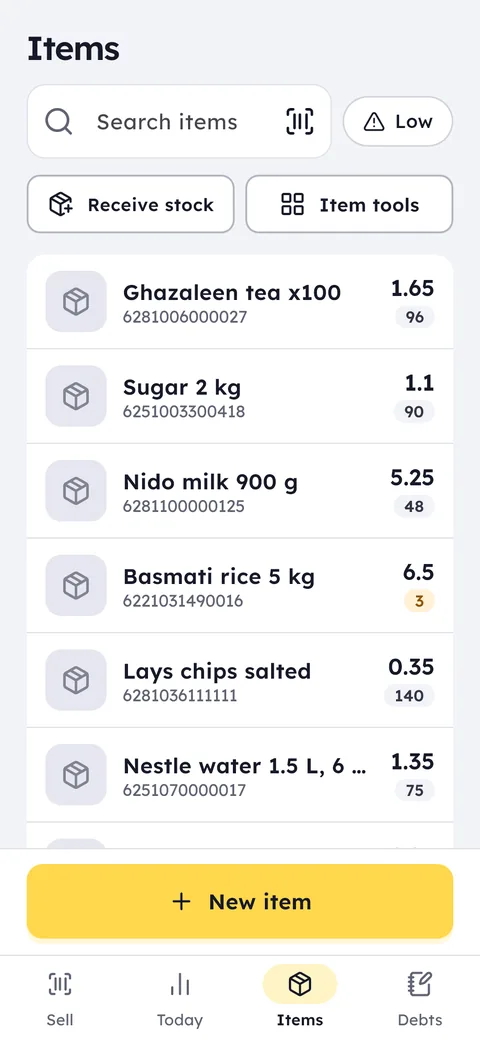
The trouble starts at the counter. A sheet does not scan barcodes, print a receipt, send the invoice to JoFotara or bring stock down on its own. If someone forgets to log a sale or deletes a row with a formula in it, the numbers drift and you cannot tell where. Ghalleh takes that work off the sheet: it scans, prints and sends the invoice, brings stock down with every sale, and shows you today's total and profit on your phone. Your sheet is not wasted either: you import it as it is, Excel or CSV up to 20,000 rows, Ghalleh matches the columns itself, and you update prices from a file in one go.
Which one fits you?
Excel is enough if
You sell a small number of items a day, do not need to issue invoices to JoFotara, and record everything yourself with no staff.
Ghalleh fits if
You have customers at the counter all day, or someone selling for you, and you want a receipt, a JoFotara invoice and stock that updates itself, while keeping Excel for planning.
Moving to Ghalleh
Start from the sheet you use now, and make sure it has a column each for name, barcode, sale price, cost and quantity.
Remove total rows, notes and merged cells, and keep each item on a single row.
On the items screen choose import and load the file as it is, Excel or CSV, up to 20,000 rows. Ghalleh matches the columns itself and shows you the rows to review before saving. Then start selling by scanning.
Common questions
Can I bring my Excel sheet into Ghalleh?
Yes. On the items screen choose import and load an Excel or CSV file of up to 20,000 rows. Ghalleh matches your columns to its fields itself: name, barcode, price, cost and quantity, and you review the rows before saving.
Do I lose Excel if I move to Ghalleh?
No. You keep planning in the sheet you know, and from it you import new items and update prices in one go, while daily selling runs in Ghalleh. For your accountant, Ghalleh makes the accountant file: a PDF with sales, tax and the JoFotara status of each invoice.
Does Excel connect to JoFotara?
A sheet on its own does not send invoices, so you have to issue them somewhere else. In Ghalleh every invoice goes to JoFotara automatically and the QR code prints on the receipt.
Open your shop on Ghalleh today.
Download the app, set up your shop yourself and try every feature free for 14 days, with no card.